Software & systems for business
Get a proposal

Systems for businesses that have
outgrown Excel and WhatsApp.

I build one system for a business’s requests, clients and orders, where you can see who’s handling what. A written proposal before you commit to anything, and a system you can try within the first weeks.

Illustration: a partners’ WhatsApp group asking for a status, a spreadsheet of requests, a paper request form, a sticky note, missed calls and a forwarded email. Pressing “Sort it out” turns the mess into a real screen, the requests screen of ReaLo’s Partner Portal, and each piece finds its place: the group’s “Status??” becomes the status column, the spreadsheet’s “Yossi on it?” becomes who’s on it, and the forwarded email becomes the due date. The buttons next to the screen switch between partner requests and event invitations.

IllustrationAn ordinary Tuesday in a business. Not client data.

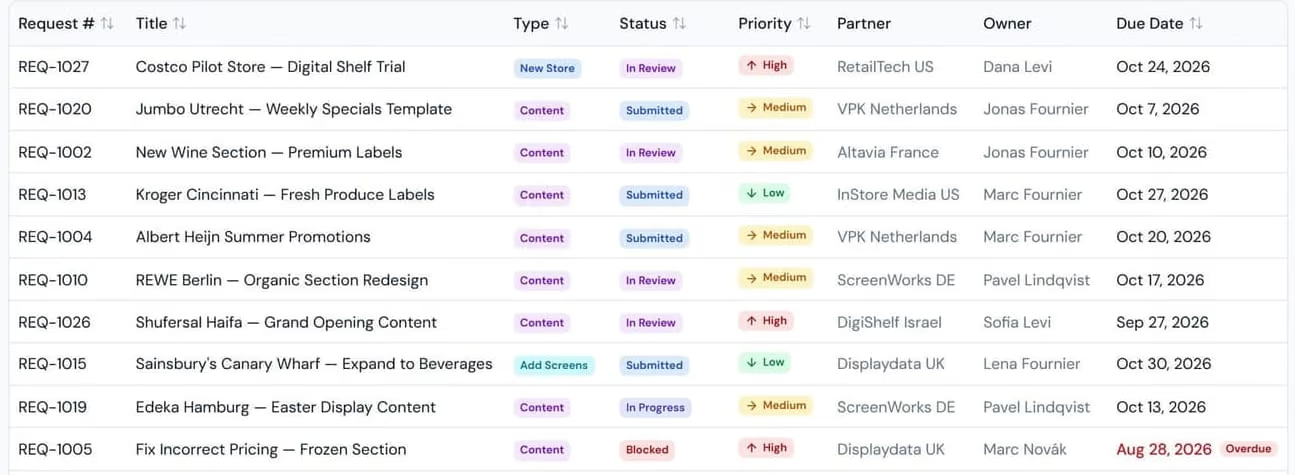
1Every question in the mess got a column of its own.Partner Portal, built for ReaLoDemo data, an excerpt from the screen.

1Every invitation is checked before payment, and you pay only when it’s sent.MomenviThe editor on the site, before payment

The requests screen of ReaLo’s Partner Portal, from the project manager’s seat: a table of requests with number, title, type, status, priority, partner, owner and due date. One request is blocked and overdue, marked in red. Demo data.
Every request in one tableStatusWho’s on itWhat’s stuck is marked red
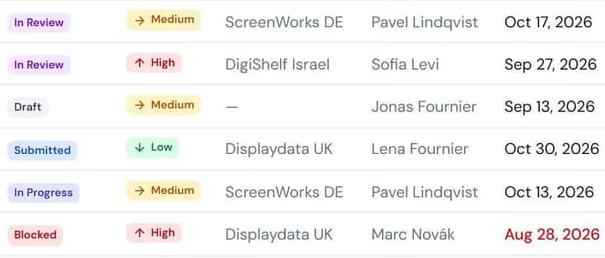
The status column of ReaLo’s requests screen: submitted, in review, draft, in progress and blocked.
Part of the same screen, without the priority column: the partner who asked, the owner and the due date of each request. A date that has passed is marked red. Demo data.
StatusWho’s on itDue dateWhat’s stuck is marked red
Partner PortalBuilt for ReaLo, with their own statuses and roles. Yours gets your names and your stages.Demo dataTry the demo
Momenvi’s editor, on a wedding invitation template, right after “Send” was pressed: a panel saying one thing is left to fix, because the countdown on screen 5 has no date and time. Screen 5 is flagged in the list of screens. Nothing has been paid yet.
You pay only when you send, via PayPlusEvery invitation is checked before paymentEvery change saves itselfMarks exactly what’s missing
Momenvi’s editor on a phone, right after “Send” was pressed: one thing is left to fix, the countdown on screen 5 has no date. Nothing has been paid yet.
You pay only when you send, via PayPlusEvery invitation is checked before payment
MomenviBefore payment, the system checks the invitation and marks what’s missing. You pay only when you send, via PayPlus.The wedding template, as on the siteTry it on the site

Sound familiar?

  • At the garageWhich car is ready? You ask whoever worked on it.
  • At the clinicAppointments in the calendar, reminders on WhatsApp, cancellations in your head.
  • At the shopThe supplier order on WhatsApp, the stock in a spreadsheet only one person understands.
  • At the officeWho got back to the client? You check three group chats.

If you recognised your business here, you’re in good company. That’s exactly where I start.

Work

What it looks like after.

Real screens from systems I built. In red pencil: how it worked before. In blue: what the system does now.

2A system for partners, built for ReaLo

Partner Portal

Each partner signs in on their own, finds the guide they need among 81, and sees where their request stands, without asking on WhatsApp.

The same requests table, as a partner sees it.

A reseller partner opens the same screen and sees only their own requests. A project manager sees every request, from every partner.

View as:
The requests table as a reseller partner sees it: four requests, all from Altavia France, and “Showing 1–4 of 4” at the bottom. Demo data.
Only their own requests4 of 4
The request number column as a reseller partner sees it: four requests, and “Showing 1–4 of 4” at the bottom.
Part of the same screen: the partner and the owner of each request, all four from Altavia France. Demo data.
Only their own requests4 of 4
The requests screen, as two roles see it. The same demo data, two cuts of the same screen.The requests screen as a partner sees it: only their own requests. Demo data, two cuts of the same screen.

The mess

The operational know-how was scattered: old categories, generic articles and guides in PDF files. Every new partner asked the same questions.

The system

One system every partner signs into on their own: a knowledge base, a short request form with status and history, and project management. Each person sees only what’s theirs, by their role.

3

Momenvi

Events and gifts: an interactive invitation that guests reply to from the link.

NowGuests reply from the link. Every invitation is checked before payment, and paid through PayPlus.

Visit the site momenvi.co.il
Momenvi’s home page on a phone: “Don’t just send an invitation. Create a moment.”, a short explanation, and a button to create a moment next to one to explore moments.
Pick the occasion, and the draft is waiting

4

The Last Signal

A 3D experience in the browser: you are R-07, a service robot on a research ship, and three crew members are waiting to go home.

NowIt opens on any device. Without a graphics card you get a window onto the Earth, and your progress stays in the browser.

Visit the site playlastsignal.com
The Last Signal’s opening screen on a phone: “R-07 / ORBITAL RECOVERY”, the title, and the invitation to begin with sound or quietly.
Nothing to install, no account
Elisha Menashe

Hi, I’m Elisha.

You talk to me directly, and I’m also the one who builds your system, so nothing gets lost along the way.

Before I suggest anything, I want to see what an ordinary day looks like for you, spreadsheets and group chats as they are.

A bit more about me

Services

What fits you?

Three kinds of work. Start with the line that sounds most familiar.

  1. “Any update?” Every day, on WhatsApp

    Business systems

    One screen your team works in: every request, client and order, with a status and an owner.

    For example:Partner Portal

    The sign-in screen of the Partner Portal demo, built for ReaLo: four seats. An administrator and a project manager with full access, an account executive limited to one country, and a reseller partner who sees only their own requests and stores. Demo data.
  2. The site is up, and the enquiries aren’t coming

    Websites

    A site that explains what you do, looks like the business, and ends in an enquiry.

    For example:This site

    The top of this site’s English home page on a desktop: the header with “Get a proposal”, the headline “Systems for businesses that have outgrown Excel and WhatsApp.”, and the mess of an ordinary day on the stage below it.
  3. There’s an idea, and no product yet

    Digital products

    A product that goes live, works well on a phone and takes payment.

    For example:Momenvi

    Momenvi’s home page on a phone: “Don’t just send an invitation. Create a moment.”, a short explanation, and a button to create a moment.

Each one is built around your business, starting from what you already have.

All the work

Working with me

Five steps. And you always know what’s next.

I start from the mess as it is, no tidying up first. I do most of the work. From you I mostly need to hear how things run today, and what isn’t working.

Every step, in detail
  1. 01

    Talk and plan Scoping

    You tell me how the business runs on an ordinary day.

  2. 02

    See the screens Design

    You see the main screens before any code is written.

  3. 03

    Build and try Build

    You try the system within the first weeks, with a short update every week.

  4. 04

    Start using it Launch

    It goes live with the domain and the connections set up, plus a short training session if it’s needed.

  5. 05

    Once it’s running Support

    When something needs a fix or a change, you write to me directly. What’s included is in the proposal.

Three commitments, in writing.

How I work on every project
  1. A written scope before you commit to anything

  2. A system you can try in the first weeks

  3. A short update every week

I’m Elisha Menashe responsible for every project myself, from the first conversation until it’s working for you.

Elisha MenasheMENASHE · Software & systems for business

What people ask me before we start.

What does it cost?
It depends on how much the system needs to do. You can start with a small first stage, and you get the exact price in writing before anything starts.
How long does it take?
You can try a first part within the first weeks. How long the rest takes depends on the scope, and it’s in the proposal before anything starts.
Nobody here is technical.
That’s fine. You tell me how the business works, in your own words, and I show you the screens before I write any code.
We’re a small business. Is this for us?
Absolutely. We start with what hurts most, and whatever can wait goes into the next stage.
We already have spreadsheets and a system. Do we throw it all out?
No need. We start from what you have, and the plan says what moves into the new system and what stays where it is.
Our staff aren’t tech people. Will they manage?
I build the screens around how they work today, and you see them before I write any code. At launch I give them a short walkthrough, if you need one.

What happens after you write.

  1. 1A quick reply.
  2. 2A 30-minute call about how the business runs today.
  3. 3A written proposal with scope, timeline and price.

Your plan · First draft

The messNot picked yet

What the business doesNot filled in yet

Where information gets lostNot filled in yet

The form fills in this page. What you write becomes page one of the plan.

You don’t need to know exactly what you need. Just send me a photo of the spreadsheet on WhatsApp, or a voice note about what’s getting in your way.

Get a proposalMessage me on WhatsApp

No commitment, and a quick reply.

Get a proposalWhatsApp